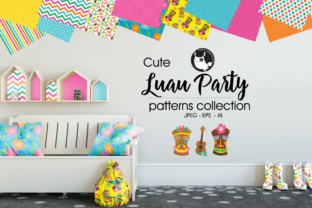
Luau Party: Tropical Design Magic
Luau Party isn’t just a theme—it’s a versatile, joyful design language rooted in tropical warmth, relaxed energy, and vibrant visual rhythm. Think palm fronds swaying in soft light, tiki motifs with clean lines, hibiscus blooms rendered with precision, and geometric wave patterns that echo ocean movement—not clichéd clip art, but intentional, high-quality pattern background design built for real creative work.
This isn’t about slapping on a generic “Hawaiian” filter. It’s about having a thoughtfully crafted, scalable resource that supports clarity, cohesion, and creativity—whether you’re designing a summer newsletter, branding a boutique wellness retreat, or illustrating a children’s activity book. The strength of Luau Party lies in its balance: playful enough to spark delight, refined enough to hold up across professional contexts.
What You Actually Get—and Why It Matters
You receive more than files—you get creative leverage:
- A set of graphic elements—curated, non-repetitive, and compositionally balanced. Each piece works alone or layered, so you’re not locked into one rigid layout.
- One EPS vector file—fully editable, infinitely scalable, and compatible across platforms (including CorelDRAW, Affinity Designer, and older versions of Illustrator). Ideal for print production where crisp edges and color fidelity are non-negotiable.
- One Adobe Illustrator (.ai) file—with layers, named groups, and editable text (where applicable), so you can adjust colors, isolate motifs, or repurpose components without guesswork.
- Individual hi-res 300 DPI JPEGs—ready for immediate use in presentations, social posts, email headers, or web banners. No rendering delays, no pixelation—even at large sizes.
That combination means you’re never choosing between flexibility and speed. You can tweak a motif in Illustrator for a custom logo variant, then drop the matching JPEG into a Canva social template—all while keeping color, scale, and style consistent.
Creative Possibilities—Beyond the Obvious
Luau Party thrives when treated as a system—not just decoration. Here’s how different users bring it to life:
For Educators & Content Creators
A science teacher uses the wave and coral motifs to illustrate marine ecosystems in a classroom poster—color-coded by depth zone. A parenting blogger adapts the palm silhouette into a subtle watermark behind printable summer activity checklists. The key is restraint: using one or two elements to reinforce meaning, not overwhelm.
For Small Business Owners
A local juice bar prints the hibiscus pattern onto reusable tote bags—paired with minimalist typography and their brand’s secondary color palette. A wedding planner embeds the tiki motif into digital RSVP cards, scaling it down to a delicate border rather than a dominant background. Consistency comes from repetition of *style*, not just imagery.
For Freelancers & Designers
You’re not limited to tropical clients. One designer used the rhythmic leaf pattern as a texture overlay in a financial services pitch deck—softened to 8% opacity and tinted navy—to add visual interest without undermining professionalism. Another converted the EPS into SVG icons for an interactive client presentation, preserving scalability and interactivity.
Staying Clear, Cohesive, and Audience-Friendly
High-quality pattern background design only delivers value if it serves your audience—not your aesthetic preferences. Ask yourself before applying Luau Party elements:
- Does this support the message? A bold tiki icon works for a cocktail menu; a delicate monochrome frond line works better for a yoga studio’s seasonal schedule.
- Is contrast preserved? Test text legibility over patterned areas. Use the included JPEGs to preview overlays in your actual layout tool—not just in isolation.
- Are colors aligned? The vector files let you recolor instantly—but avoid clashing with your brand palette. Try shifting hues using HSB sliders instead of random hex swaps for harmonious results.
- Is scale intentional? A background pattern at 40% size adds texture; at 120%, it becomes a focal point. Match scale to hierarchy: large = primary visual anchor; small = supporting rhythm.
Also remember: consistency doesn’t mean uniformity. Rotate a motif 15° for a dynamic banner header. Flip a frond horizontally to create mirrored symmetry in a brochure spread. These small, deliberate edits keep your output original—without starting from scratch.
Real-World Applications That Work
Here’s what’s proven effective—not theoretical, but tested:
- Digital course sales pages: Using the wave pattern as a subtle top-to-bottom gradient overlay behind headline text—adds motion and warmth without competing for attention.
- Print-on-demand products: Scaling the EPS to fit standard mug or notebook dimensions, then exporting as CMYK TIFF for accurate color reproduction with print partners.
- Social media carousels: Placing each individual JPEG on its own slide, paired with concise, benefit-driven copy—no need to edit the image; just align text and maintain spacing rhythm.
- Internal team templates: Saving the Illustrator file as a library item in CC Libraries, so designers across a marketing team pull from the same source—ensuring brand-aligned assets stay version-controlled and accessible.
No special software required to begin. Even if you only use the JPEGs, you gain access to professionally drawn shapes, balanced negative space, and intentional proportions—details that separate polished work from rushed execution.
Final Thought: Design Is Decision-Making
Luau Party gives you strong raw material—but its impact comes from how thoughtfully you apply it. That means knowing when to simplify (a single frond as a bullet point), when to layer (pattern + photo + transparent overlay), and when to step back entirely (letting white space breathe around a centered tiki icon).
It’s not about making something “look tropical.” It’s about using intentional design to make your message feel warmer, more inviting, and more human—whether you’re launching a product, teaching a lesson, or sharing an idea. And because every file is built for real-world use—not just display—you spend less time troubleshooting and more time connecting.