Valentine Digital Papers for Creative Projects
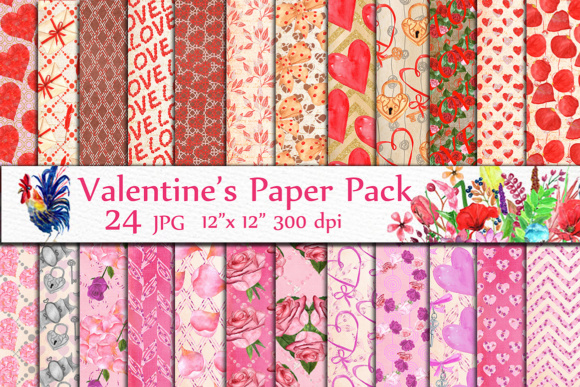
Valentine Digital Papers are ready-to-use, high-resolution patterned backgrounds designed specifically for love-themed designs. Think of them as digital scrapbook paper—beautiful, cohesive, and instantly usable in both personal and professional work. You’ll receive 24 JPG files, each sized at 12 x 12 inches and rendered at 300 dpi for crisp, print-ready quality. These aren’t generic florals or vague reds—they’re thoughtfully crafted Heart digital papers, Love papers, and Sweet Valentines patterns that capture the warmth and charm of the season without feeling cliché.
Why These Digital Papers Stand Out
What makes this collection especially useful is its balance of versatility and intentionality. Each file is a full 12 x 12 inch canvas—ideal for standard scrapbook layouts, printable cards, and social media graphics. The 300 dpi resolution means you can confidently print them on photo paper, craft paper, or even fabric transfer sheets without pixelation or loss of detail. Unlike low-res web graphics or stretched stock images, these files hold up beautifully whether you’re making a handmade greeting card or designing a boutique product label.
The 24 included designs offer real variety: soft watercolor hearts, delicate line-art cherubs, subtle gingham with heart motifs, vintage lace overlays, modern geometric love patterns, and warm-toned confetti prints. This range helps avoid visual fatigue—whether you're designing a full wedding suite or just updating your Instagram story templates for February, there’s a pattern that fits the mood and medium.
Where You’ll Actually Use Them
These Valentine Digital Papers shine where time, consistency, and aesthetics matter. For hobbyists, they’re perfect for DIY greeting cards, journal covers, or printable wall art—no design experience needed. Just open one in Canva, Photoshop, or even Microsoft Word, layer your text or photos, and print. Educators use them to create themed lesson plans, classroom posters, or student reward certificates—adding visual warmth without extra prep time.
Small business owners find them especially valuable. A candle maker might use a soft blush-and-gold heart pattern as background for a limited-edition Valentine’s label. A freelance graphic designer could incorporate one into a client’s email newsletter template. Bloggers and content creators use them as consistent backdrops for Pinterest pins or Instagram carousels—giving their seasonal content a polished, branded look in minutes.
They also work well for digital-only uses. Because each file is a clean, high-res JPG, you can drag and drop them into presentation slides (PowerPoint, Google Slides), ebook interiors, or even Zoom virtual backgrounds. One user recently printed several onto sticker paper to create custom address labels for her small stationery shop—proving how easily these files bridge digital and physical workflows.
Simple Ways to Get Started
If you’re new to working with digital papers, start small. Try opening one file in a free tool like Canva. Upload it as a background, then add a simple phrase like “Be Mine” in a clean font—center it, adjust contrast if needed, and download as a PNG. That’s your first printable card or social post.
For more advanced uses, layer multiple papers using blending modes in Photoshop (try “Multiply” over a photo to soften contrast) or use them as clipping masks for shapes and text. Designers often combine two patterns—one as background, another as a subtle border or corner accent—to add depth without clutter.
You don’t need special software to benefit from them. Even basic tools like Preview (Mac) or Photos (Windows) let you crop, rotate, or resize files before printing. And because they’re JPGs—not layered PSDs or editable vectors—you won’t hit compatibility issues across devices or platforms.
Things to Keep in Mind Before You Begin
First, consider your end use. If you plan to print large-format items like posters or banners, double-check that your printer supports 12 x 12 inch media—or be prepared to tile and assemble sections. Most home printers handle 8.5 x 11 or A4, so you may want to scale down or crop strategically.
Second, remember these are backgrounds, not standalone designs. They work best when paired with complementary fonts, photos, or illustrations. Avoid overcrowding—let the pattern breathe. A light-colored paper with fine detail pairs well with bold black text; a busier print looks cleaner with minimal white space and simple icons.
Third, licensing matters. These files are intended for personal and commercial use—including physical products you sell—but always review the included license terms. You’re free to use them on mugs, tote bags, or digital planners you distribute, but you can’t resell the papers themselves as a standalone digital product or claim them as your original artwork.
Lastly, color accuracy varies between screens and printers. If color fidelity is critical—for example, matching brand tones or Pantone shades—print a test sheet first. Slight shifts in reds, pinks, or creams are normal, especially on uncoated paper or budget inkjet printers.
Realistic Expectations, Real Creative Wins
Valentine Digital Papers won’t replace custom illustration or full branding packages—and they’re not meant to. Instead, they fill a quiet but essential gap: the need for beautiful, on-brand, ready-to-go visuals that save hours without sacrificing quality. They’re the difference between scrambling to finish a last-minute card and having a polished set ready by Tuesday afternoon.
What makes this collection especially thoughtful is how it avoids trend overload. There are no neon gradients or overly busy motifs—just timeless, adaptable patterns that feel personal rather than mass-produced. Whether you’re a teacher prepping a classroom activity, a solopreneur launching a Valentine’s promotion, or someone simply wanting to send something heartfelt to a friend, these papers meet you where you are.
And because they come as individual JPGs—not a single ZIP with confusing folders or hidden layers—you can jump right in. No tutorials required. No learning curve. Just open, choose, and create.